
Current subscription

Log in to Availight Cloud
New user?
or
Try other login options
By signing in, you agree to Availight's Terms of Service. See our Privacy Notice for additional information.
Local setup and local status control remain available without Availight Cloud.
Availight Cloud
Register to Availight Cloud
Create the account you will use with the Availight app and customer portal. You can add contact preferences later.
* Required
or
Create your account with
By creating an account, you agree to Availight's Terms of Service. See our Privacy Notice for additional information.
Password help
Sending reset email
Please wait while Availight Cloud prepares your password reset email.
Restoring your session...
Availight Cloud
 Home
Home
Welcome to your Availight Cloud at a glance!
Secure setup link
 Finish Controller setup in Availight Cloud
Sign in with the same Availight account you use for the app and customer portal. The Controller will only receive setup status, never your provider passwords or private calendar links.
Checking setup link...
Right now
 Checking your Availight devices…
We’ll show only the items that need action.
 Needs attention
Actionable issues appear here.
Privacy request
 Your Data Export Is Ready
Download your protected Availight data export. The file is permanently removed from the server immediately after this download.
 Your claimed devices
List of Controllers available in your account.
Controller workspace
Selected device
Choose a claimed Controller to view and manage its available controls.
 Controller overview
Review this Controller's current status, Cloud connection, local access, recovery tools, and account ownership.
Remote status
 Push Status Remotely
Ask the selected Controller to show a new availability status from anywhere.
Recent remote changes
Each command stays visible while the Controller picks it up and confirms the change.
Cloud device controls
Device settings
Manage the selected Controller and paired Door Unit without leaving Availight Cloud.
Remote status details
Remote Readiness
These checks show whether the account, cloud queue, and claimed Controllers are ready for hosted actions.
 Safety checks
Remote changes are limited to signed-in account owners and recorded in the account activity history.
 How Autopilot works
1 ConnectConnect your personal and work calendars.
→
ConnectConnect your personal and work calendars.2 PrioritizeHigher-priority active signals take precedence.
→
PrioritizeHigher-priority active signals take precedence.3DisplayYour Controller keeps the Door Unit status current.
DisplayYour Controller keeps the Door Unit status current.Autopilot sources
Connect and manage available Cloud sources from this portal or from the mobile app.
Source priority
Drag sources into the order Autopilot should use when signals overlap.
 Software update readiness
We will compare your Controller with the current Availight versions as soon as it checks in.
Your devices
Each device card explains whether there is anything to review.
Availight Duo
Make your availability clear before interruptions begin.
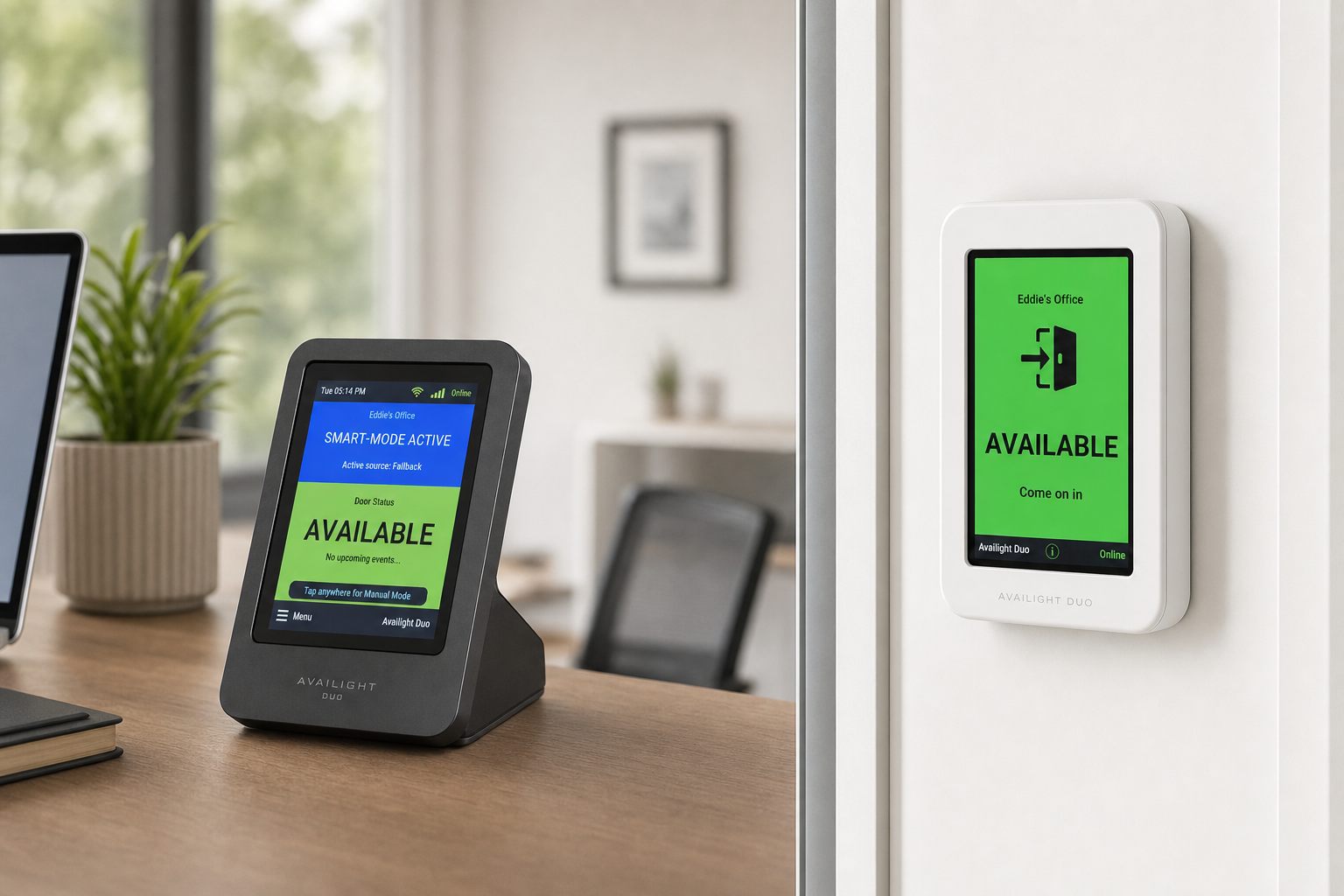
Availight Duo pairs a desk-side Controller with a wireless doorway display so people can see when you are available, focused, busy, or on a call.
Auto status from calendars and calls
 Wireless doorway display
Up to 2 Duo sets per user
Wireless doorway display
Up to 2 Duo sets per user
 Local-first manual controls
Availight Cloud
Place your Availight devices on autopilot
Subscribe to Availight Cloud to keep your availability current with less effort. Autopilot can use supported calendars, communication services, and phone activity to help each Availight Duo show the right status while you stay in control.
 Your Cloud Subscription
Checking account and trial eligibility…
 Choose your plan
Let’s see which plan is the best fit for you.
We’ll recommend a plan from the Availight Duo devices claimed in your account.
Choose monthly or yearly billing.
Device requirement
Checking for an eligible claimed Availight Duo…

Family membership
Manage your Family membership
Invite and manage the additional user included with an active Availight Family subscription.
Secure checkout
Complete your subscription
Order Hardware
Order Availight Duo
Secure checkout
Complete your Availight Duo order
 Profile and contact preferences
Account details will appear after sign-in.
Secure payment management
 Payments
Manage saved payment methods, invoices, and subscription billing.
Loading payment details...
Payment method
Secure card update
Add or replace your payment method
Your saved contact details are prefilled and remain editable. Payment details are entered in an encrypted payment field and are never stored by Availight.
Billing information
Billing support
Need help with a payment?
Send Availight Support the billing question and safe account context needed to help faster.
Payment history
Invoices and receipts
Addresses
 Saved addresses
Save the places Availight can use for billing details and Duo delivery.
 Orders
Orders placed from this Availight Cloud account appear here.
Availight Duo
A clear availability signal from your Availight devices
The Duo set pairs a desk-side Controller with a wireless Door Unit. Use local manual status control and add optional Autopilot through Availight Cloud.
Privacy request
 Privacy and data
Download your protected Availight data export. The file is permanently removed from the server immediately after this download.
 Delete Availight Cloud accountWarning: This action is destructive and can't be undone
This sends a reviewed request to Availight Support; it does not instantly delete your account. You must have signed in recently.
Some records may be retained when required for security, legal, backup, or support-history reasons. Review the account deletion section of the Privacy Notice.
 My support requests
Review conversations and replies associated with this account.
Support
 Need help with Availight?
Tell us what you are seeing and we will help guide the next step. When you can, include the room, device, or screen involved. Availight will attach the safe account and device details we need, so you do not have to search through technical settings.
 New support request
Add a short title, choose the related device if one is involved, and describe what happened. Clear details help us respond faster.
Support diagnostics
Shareable support details
This safe summary can help support understand your setup without including passwords, private calendar details, or sensitive tokens.